
Track Me Fast Package Tracker
B1 Group SoftwareShopping
4.226.00 Reviews
- Version
- 1.15.6
- Installs
- 10.00K
- Age Rating
- Everyone
Screenshots
Our Review of Track Me Fast Package Tracker
 Analysis by Appyee
I know the small hassle that starts after placing an order: the shop says it has shipped, but the useful details are scattered between confirmation emails, carrier pages, and notifications. I’d reach for Track Me Fast Package Tracker when I want one place to follow several online orders, rather than opening a new tracking page every time I remember one is on the way. It is a free shopping app from B1 Group Software, and its purpose is practical: make the stretch between checkout and delivery easier to keep an eye on.
When several orders need a home
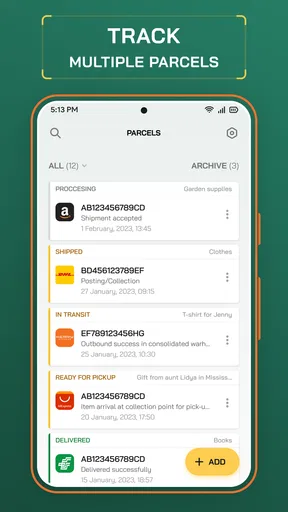
The app makes the most sense for someone who shops from different stores or has more than one parcel moving at once. A tracking number is the starting point; once you have it, you can add the shipment and use the app as a central place to check progress. That simple workflow is useful when a retailer’s order page is good for receipts but awkward for following a parcel, or when you would rather not keep a string of carrier tabs open.
For example, imagine ordering a household item from one shop and a gift from another. Their dispatch emails arrive at different times, and each parcel may use a different delivery service. Instead of relying on memory, I’d add each tracking number as it becomes available, then check the combined picture when deciding whether I need to stay home or ask someone else to receive a delivery. The benefit is less about making a parcel move faster and more about reducing the small amount of admin that comes with several orders.
From tracking number to a useful update
My approach would be to copy the number from the dispatch message, enter it in the app, and give the shipment a label that makes sense to me if that option is available in my workflow. When several parcels are active, a clear label matters: “birthday gift” is easier to recognize at a glance than a long string of digits. I would also keep the original retailer confirmation until the package arrives, since it contains order details that a tracking screen is not meant to replace.
The app is intended to follow online shipments across courier services, which is its key advantage over checking each carrier separately. A carrier’s own page can still be the better place for a detailed delivery instruction or a service-specific action, but a tracker is more convenient for a quick overview. I’d use this app to see whether anything has changed, then move to the retailer or carrier when I need to handle a delivery rather than simply monitor it.
First Impressions and Setup
When I first downloaded Track Me Fast Package Tracker, I was impressed by its clean and user-friendly interface. The setup process was a breeze. You just input your tracking number, and boom, you’re ready to go. I didn’t have to jump through hoops or deal with any unnecessary sign-ups, which is always a plus in my book.
The app supports a wide range of courier services, which is fantastic because I tend to shop from various international sites. Whether it’s FedEx, UPS, DHL, or even some lesser-known local services, this app has got you covered. It’s like having a personal assistant that keeps tabs on all your packages from different corners of the world.
Features That Stand Out
One of the coolest features is the real-time updates. You get notifications at every step of your package’s journey—departing warehouse, out for delivery, and even when it’s delivered. This is particularly helpful if you’re someone who likes to plan your day around when your package might arrive. No more missing deliveries!
The app also offers a neat little map view where you can see exactly where your package is at any given moment. It’s like being able to peek over the shoulder of the delivery driver. For the visually inclined, this feature is a game-changer. You can literally watch your package travel across the map.
Another feature I appreciated was the ability to store multiple tracking numbers. I often have several packages on the go, and this app allows me to keep everything organized in one place. The interface is intuitive, with each package clearly labeled and easy to access.
User Experience and Performance
Performance-wise, Track Me Fast Package Tracker is smooth sailing. I haven’t encountered any bugs or crashes during my time using it. The app loads quickly and transitions between screens seamlessly. It’s evident that the developers have put a lot of thought into making this a polished experience.
The notifications are timely and have just the right amount of information. They’re not overly intrusive, which I appreciate. I’ve used other tracking apps where the notifications were either too scarce or overloaded with unnecessary details. This app strikes the perfect balance.
For day-to-day use, I’d treat a notification as a prompt to check the shipment, not as a guaranteed appointment. Tracking events describe what the carrier has reported, and the timing of a scan can vary as a parcel changes hands. If a package is important, I’d still check the carrier’s own channel before rearranging a full day around an estimated arrival. That small habit keeps a convenient overview from turning into false certainty.
Choosing the right tracking workflow
Compared with using only retailer order pages, a dedicated tracker is handy when purchases come from several shops: it gives me a single place to review their progress. Compared with using only carrier apps, it can save time when the shipments use different services. The trade-off is that a general tracker is not a substitute for every carrier’s own delivery controls. If I need to change a drop-off instruction, resolve a failed delivery, or ask about a parcel, I’d go directly to the company handling it.
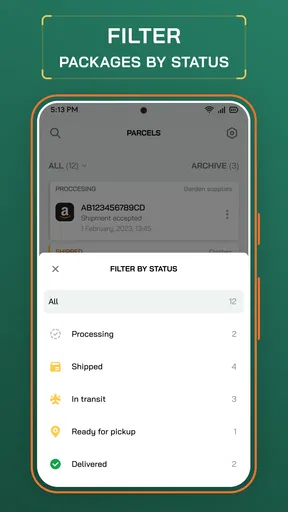
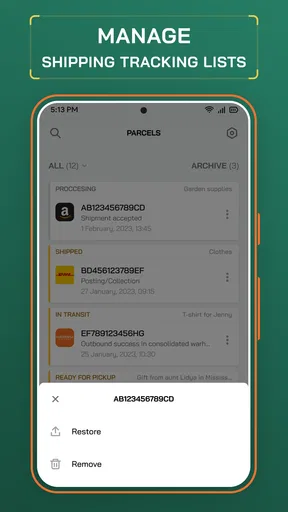
I’d also avoid adding every old shipment indefinitely. Keeping the active list focused makes the next delivery easier to spot and reduces the chance that I’ll mistake a completed parcel for one still in transit. A simple routine works well: add the number after dispatch, check the status when an alert arrives, and remove or set aside the shipment once the order is safely received. That is a more useful way to use a tracker than repeatedly refreshing it while no new scan has appeared.
The app is a better fit for people who want a straightforward overview than for someone who needs a full parcel-management system. If you receive occasional orders from one retailer, its own order page may already be enough. If you manage business deliveries, need detailed exception handling, or depend on carrier-specific changes, the carrier’s service is likely the more important tool. I see this app as a convenient middle layer, not a replacement for the people and services responsible for the parcel.
What Could Be Improved
While I’m overall impressed, there are a few areas where I think the app could improve. For instance, the map feature, while super cool, sometimes feels a bit cluttered, especially when you have multiple packages being tracked simultaneously. A toggle feature to switch between different package views would be a handy addition.
Additionally, I’d love to see an option for personalized alerts. Maybe something like a custom sound or message when your package is only a few stops away. This would make the app not only functional but also a bit more fun and engaging.
There’s a practical limit to what any tracking screen can tell me: it can only show the delivery information available for a shipment, and a quiet period is not automatically proof that something has gone wrong. When an update appears stuck, I’d compare it with the retailer’s dispatch message and then check the carrier’s own tracking page before drawing conclusions. This avoids duplicate effort and gives me a sensible next step if the shipment really needs attention.
Cost is another point worth considering before making the app part of a regular routine. It is free to install, but it also offers in-app purchases priced from $0.99 to $39.90 per item. I would start with the free experience and decide whether any paid option is useful only after seeing how I actually track parcels. Someone who adds a shipment now and then may have no reason to spend; a frequent online shopper can judge the value against their own needs rather than assuming every feature is essential.
Who will get the most from it
The strongest use case is a person with a handful of active orders from different sellers who wants fewer places to check. It is especially convenient during a busy week: I could add a parcel after its dispatch notice, glance at its progress while planning errands, and then use the carrier’s channel if a delivery needs special handling. The app’s value is in keeping the overview close at hand, not in promising a precise arrival time or taking over the delivery company’s role.
It is available for everyone, and the Android version requires OS 7.0 or later. The current version is 1.15.4. Its average rating is 4.2 from around 400 ratings, with 23 written reviews, and it has passed 10,000 installs. Those figures suggest that it has found an audience, though I’d still judge it by whether its basic tracking workflow fits my own shopping habits. The modest scale also makes it sensible to try it with a few non-urgent deliveries before relying on it as the sole place I monitor something time-sensitive.
One useful habit is to keep a dispatch email or order receipt until delivery is complete, especially for an expensive or time-sensitive purchase. The tracker can help answer “Has anything changed?” but the receipt is where I would return for the order reference, seller details, and purchase context. Keeping those roles separate makes the workflow clearer: the app is for monitoring movement, while the retailer and carrier remain the places to resolve account or delivery issues.
I’d also be selective about alerts. If I am expecting several parcels, every routine scan may not deserve an interruption; the most useful checks are the ones that help me make a decision, such as whether I should be home or whether a shipment has reached a meaningful stage. If notifications feel too frequent, I would check the app’s available settings and adjust how I use it rather than opening the tracker after every minor status change. The point is to reduce attention spent on delivery, not turn each scan into another task.
The Final Verdict
All in all, Track Me Fast Package Tracker is a must-have for anyone who does a lot of online shopping. It’s reliable, easy to use, and packed with features that make tracking your packages a stress-free experience. While there’s always room for improvement, the app delivers on its promise to keep you updated every step of the way.
If you’re tired of the mystery of where your package might be, give this app a try. It might just become your new best friend in the world of delivery tracking. Happy tracking!
Verdict
Strengths of Track Me Fast Package Tracker
- User-friendly interface simplifies tracking.
- Supports multiple courier services.
- Real-time updates on package location.
- Customizable notifications for alerts.
- Minimal battery consumption during use.
Limitations of Track Me Fast Package Tracker
- Limited offline functionality.
- Occasional delays in update refresh.
- Ads can be intrusive at times.
- No dark mode available.
- Lacks integration with smart assistants.
Similar Picks in This Category
View All
SHEIN-Shopping Online
Roadget Business PTE. LTD.4.8

Amazon Shopping
Amazon Mobile LLC4.4


Mercado Libre: Compras online
Mercado Libre4.8

Wish: Shop and Save
Wish US Holdings LLC4.7

Alibaba.com - B2B marketplace
Alibaba Mobile4.4
Frequently Asked Questions
What platforms is Track Me Fast Package Tracker available on?
Track Me Fast Package Tracker is available for both Android and iOS platforms. Users can download it from the Google Play Store or the Apple App Store. Ensure your device meets the app’s system requirements for a seamless tracking experience.
How does Track Me Fast ensure package tracking accuracy?
Track Me Fast connects with multiple courier services to provide real-time tracking updates. It uses advanced algorithms to sync data from various carriers, ensuring users receive the most accurate and timely information about their package locations and delivery schedules.
Is there a limit to the number of packages I can track simultaneously?
While Track Me Fast allows users to track multiple packages at once, there may be a limit based on the subscription plan. The free version may have restrictions, while premium plans typically offer unlimited tracking options. Check the app’s plan details for specific limits.
Does Track Me Fast send notifications for package status changes?
Yes, Track Me Fast provides push notifications for status changes and important updates. Users can customize notification settings to receive alerts for events like shipping, out-for-delivery, and successful delivery, ensuring they stay informed about their packages at all times.
Is my data secure with Track Me Fast Package Tracker?
Track Me Fast prioritizes user security by employing encryption protocols to safeguard personal and tracking data. It adheres to data protection regulations, ensuring that user information is stored and processed securely, giving users peace of mind while using the app.
